
Squarespace is a self-contained website builder — pages, blog, store, and a design system that doesn’t expect an external CMS behind it. Contentful is the opposite: a headless CMS built to feed structured content into whatever front end needs it. Teams that land on both usually didn’t plan it that way — marketing runs the public site on Squarespace for speed of design, while product or editorial teams model richer content in Contentful for other channels. The result is the same announcement, product spec, or team bio typed into two systems that have no way to talk to each other on their own. This guide covers how to sync Contentful and Squarespace without code, in either direction.
Why sync Contentful with Squarespace
Contentful and Squarespace serve different jobs, and most teams running both want them sharing data instead of duplicating it by hand:
- One content source, multiple surfaces. Content modeled in Contentful — team bios, product specs, FAQ entries, locations — can populate Squarespace blog posts or page content without a writer re-entering the same copy on both sides.
- Squarespace as the public site, Contentful as the structured backend. Teams that need Contentful’s content modeling (references, rich text, custom fields) for other channels — an app, a partner feed, a separate microsite — can still keep the public Squarespace site current from the same source.
- Editorial handoff without copy-paste. A content team drafts and approves entries in Contentful; once approved, the sync pushes the finished copy into the matching Squarespace blog post or page field, so publishing isn’t a manual re-type step at the end of an editorial workflow.
A one-time copy from Contentful into a Squarespace page works for a single launch. It stops working the first time either side updates independently, which is most weeks.
What you need before you start
- A Squarespace site with a plan that allows API/content access, and admin access to the pages or blog you want synced.
- A Contentful space with a content type shaped to match — fields for title, body, images, and whatever else should land on the Squarespace side.
- A Synquake account — sign up free at app.synquake.com.
No developer, no custom Squarespace extension, and no Contentful app to build. Synquake connects to both platforms’ APIs directly.
Step-by-step: connecting Contentful and Squarespace
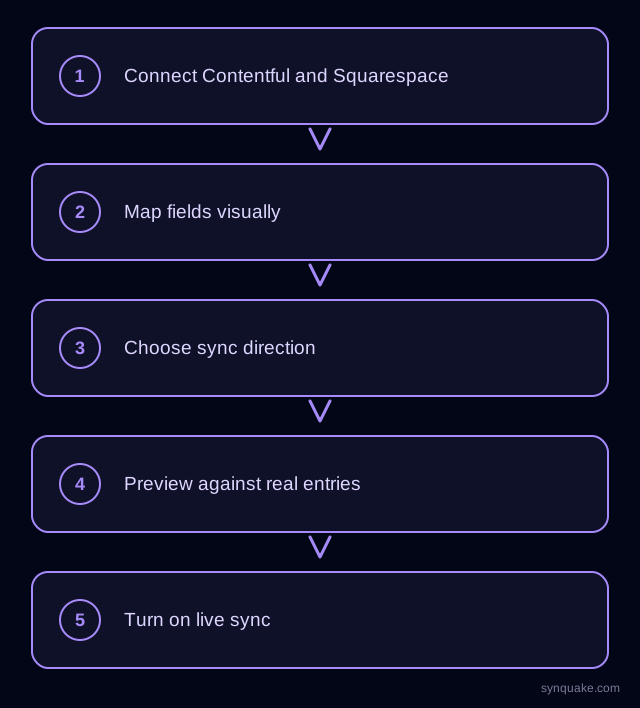
1. Connect both accounts
Add Contentful and Squarespace as connections in Synquake. Contentful authorizes with a space API token; Squarespace authorizes through its own API credentials. Neither side needs credentials passed around the team by hand.
2. Choose what to sync
Decide which Contentful content type maps to which Squarespace surface — commonly a Contentful “Article” or “Announcement” entry mapping to a Squarespace blog post, or a Contentful “Team Member” or “Location” entry mapping to fields on a Squarespace page.
3. Map fields visually
Draw the connections between Contentful fields (short text, rich text, media, reference) and Squarespace fields (title, body content, featured image, tags). Field types don’t need to match exactly up front — Synquake handles the conversion, including rich text landing as formatted Squarespace content.
4. Choose sync direction
Pick one-way (Contentful → Squarespace, the common case when Contentful stays the system of record for structured content) or two-way sync, so an edit made directly on the Squarespace side flows back into the Contentful entry. Two-way sync is included on every Synquake plan, not a paid upgrade.
5. Preview before going live
Run a preview sync against a handful of real entries first. Confirm titles, body copy, and images land in the right Squarespace fields before enabling continuous sync.
6. Turn on live sync
Once the preview checks out, enable scheduled or real-time sync. From here, an approved change in Contentful flows into the matching Squarespace content automatically, with no manual re-entry step.
Common Contentful–Squarespace sync scenarios
- Blog content modeled once, published everywhere. Articles drafted and structured in Contentful sync into Squarespace blog posts, so the same editorial workflow feeds the public site without a copy-paste handoff.
- Multi-site consistency. A company running a Squarespace marketing site alongside an app or partner-facing surface built on Contentful content keeps bios, product details, or location data consistent across both without maintaining them twice.
- Campaign pages from structured entries. Marketing can model a campaign or landing-page entry in Contentful with every field it needs, then sync the finished copy into a live Squarespace page the same week.
- Editorial approval before publish. Draft and review content in Contentful’s workflow states; only approved entries sync into the public Squarespace site, keeping drafts out of production.
Avoiding common sync problems
- Rich text formatting mismatches. Confirm Contentful’s rich text fields map to a Squarespace field that actually renders formatting (headings, links, lists) rather than a plain-text field that strips it.
- Image handling. Contentful media assets sync as URLs; make sure the Squarespace side is configured to pull them into its own media library rather than leaving a broken reference.
- Duplicate entries. Set a stable matching field (the Contentful entry ID) so re-running a sync updates the existing Squarespace page or post instead of creating a new one each time.
- Publishing drafts by accident. If two-way sync is enabled, confirm only published (not draft) Contentful entries are included in the sync scope, so unfinished content doesn’t appear live.
Beyond Contentful and Squarespace
Synquake’s sync is any-to-any across nine platforms — Airtable, Webflow, WordPress, Supabase (including Lovable-built apps), Wix, Shopify, Squarespace, Google Sheets, and Contentful — plus CSV import on every plan. The same Contentful content you sync with Squarespace can also feed a Webflow CMS Collection or an Airtable base for internal content planning, without building a separate integration for each. See the full integrations page for details, or read how it works for the connection, mapping, and monitoring model.
Related reading
- How to Sync Contentful and Webflow Without Code
- How to Sync Squarespace and Webflow Without Code
- How to Sync Google Sheets and Squarespace Without Code
Get started
Syncing Contentful and Squarespace without code keeps structured content and the public site aligned without a manual re-entry cycle. Start your first Contentful-to-Squarespace sync free and preview it against real entries before going live.